Shapes and Shadows Max Dupain

Tuesday, 3 November 2015
Exam Revision 3
Please see the google classroom for revision material related to Max Dupain and modernism.

Sunday, 1 November 2015
Exam Revision - Exposure & Composition 2

1. Extreme close-up - shallow depth of field (background will appear out of focus).
2. Mid/long shot - greater depth of field (everything will be in focus).
3. Freeze motion - fast shutter speed.
4. Blurred motion - slower shutter speed.
5. Rule of thirds.
6. Leading lines.
Research and post answers to the following 3 questions.
1. Explain the relationship between aperture and shutter speed.
2. What is depth of field?
3. What function on your camera is most important to consider when taking a photograph of a moving object? Explain
Sunday, 25 October 2015
Exam Revision - Exposure & Composition
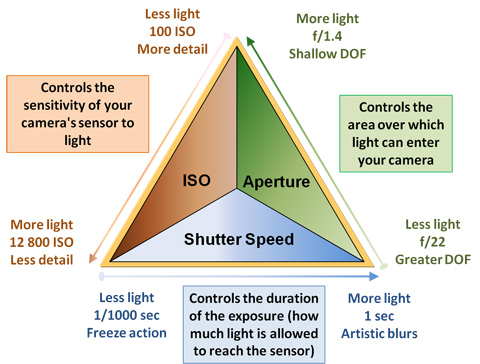
To revise exposure and composition take the following photographs on manual and post on your blog - remember to label your photos with task number and exposure settings.
1. Extreme close-up - shallow depth of field (background will appear out of focus).
2. Mid/long shot - greater depth of field (everything will be in focus).
3. Freeze motion - fast shutter speed.
4. Blurred motion - slower shutter speed.
5. Rule of thirds.
6. Leading lines.
Monday, 19 October 2015
Developing Advertising Ideas

Start looking at ads in different media and taking note of the ones that really work, and why they work. Consider using humour, satire, or parody to engage your audience.
For an introduction to what makes a successful advertising campaign view you tube clips from The Gruen Transfer - The Pitch.
Sunday, 11 October 2015
Adobe Illustrator
Your final logo will be rendered in Adobe Illustrator. Please access the Introduction to Adobe Illustrator through our google classroom.
Also, don't forget plenty of great tutorials are available online through Adobe TV.
To get started, create a new file - sized at A4 - and experiment with the brush and blob blush tools. Follow this link to Webgraphics for an introduction to this handy and versatile tool.
You may also wish to register for a free 10 day trial of design resource hub Lynda.com, which has a wealth of tutorials and tips relevant to logo design.
Also, don't forget plenty of great tutorials are available online through Adobe TV.
To get started, create a new file - sized at A4 - and experiment with the brush and blob blush tools. Follow this link to Webgraphics for an introduction to this handy and versatile tool.
You may also wish to register for a free 10 day trial of design resource hub Lynda.com, which has a wealth of tutorials and tips relevant to logo design.
Saturday, 10 October 2015
A Brief Introduction to Logo Design

Above are a handful of logos that are simple, uncluttered, iconic, and memorable. They are more than a brand symbol - they instantly generate associations around what each product stands for (ie, Nike's 'tick of approval', the Olympics linked rings = unity).
6. Your job as a designer is to decide what you want your brand to be associated with (quality, reliability, etc) and try to convey aspects of that in your logo design. Follow this link to view a slide show - Introduction to Logo Design.
7. Follow this next link to experiment with some "free" and very basic design software at Logo Maker. The first page has some good advice on generating an effective logo, and a link to their editing software. NB* Don't buy your design - just access the free web-based version and link it to your blog.
Thursday, 8 October 2015
Logo Design Week 1 Term 4
By now you ought to have posted your definition of the term logo, 3 examples of logos you find visually effective, and decided on the product/service you are to develop your logo for. These are to be posted on your blog.
Today, please continue with the following:
4. Write a brief rationale for your proposed business idea - describe your product/service, who is your target market/demographic? What values/associations do you wish to make with your product/service? Post on blog.
5. Begin sketching ideas for your logo: produce at least 5 different design ideas for your product/service. Photograph your sketches and upload to your blog. *NB - These sketches are works in progress, don't be too concerned with the quality of your drawing at this stage: what is important is the idea.
Today, please continue with the following:
4. Write a brief rationale for your proposed business idea - describe your product/service, who is your target market/demographic? What values/associations do you wish to make with your product/service? Post on blog.
5. Begin sketching ideas for your logo: produce at least 5 different design ideas for your product/service. Photograph your sketches and upload to your blog. *NB - These sketches are works in progress, don't be too concerned with the quality of your drawing at this stage: what is important is the idea.
Tuesday, 6 October 2015
Term 4 - Logo Design & Yearly Examination

Welcome to Term 4.
Your yearly examination will take place in Period 2, Friday 13th November, Week 6, and will cover material from your studies this year. We will be spending alternate lessons revising this content.
This term we will also be engaged in logo design. Logos provide instant branding and recognition for many successful product brands and services. You will be required to develop a logo for your own real or imagined product or service. We will begin with drawings and then reproduce these using Adobe Illustrator, the industry standard design tool.
To begin, do the following:
1. Research and develop a definition for the term logo, and enter this on your blog, under the heading Logo Design.
2. Then research and post 3 logos and write a brief entry describing why you think these logos are memorable or effective.
3. Brainstorm ideas for a product or service that you intend to develop a logo for - this could be anything from a landscaping service to a photographic studio. Post this on your blog.
Monday, 7 September 2015
Creating Contact Sheets Using Adobe Bridge

It is a requirement of the assessment task that you create and upload contact sheets of all your photographic work to date.
View Creating Contact Sheets Using Adobe Bridge (a quick 5 minute tutorial) before attempting to make your own.
Tuesday, 1 September 2015
Structural Frame Analysis
Choose one of your most successful photographs and write a Structural Frame Analysis. Be sure to address all the dot points referenced in the Structural Frames Diagram. Then write your answer in full sentences. Post on your blog.
1. Does your photograph use any of the elements of design (the basic things that can be seen) - line. colour, tone, texture, shape, direction, size? Refer to them.
2. The principles of design (the arrangement of those basic things) - focal point, balance, harmony, contrast, directional movement, rhythm - are expressed in how you have used the elements in different ways. Refer to the principles to describe the composition of your photograph.
3. Are signs, symbols or codes used in your photograph? Refer to the subject matter - e.g. skulls, flowers, clocks - what are they symbolic of?
4. What materials did you use? Refer to cameras, lights, props - exposure settings, arrangement, etc.
5. What techniques or processes did you use? Discuss your work process - e.g. choice of subject, composition, lighting, exposure, editing, uploading.
6. Is your photograph taken in a recognised style or genre - e.g. still life, architectural, fashion, documentary, etc. Does this style appear in a recognised art movement (e.g. pictorialism, modernism) Can you name a photographer who works in this style?
1. Does your photograph use any of the elements of design (the basic things that can be seen) - line. colour, tone, texture, shape, direction, size? Refer to them.
2. The principles of design (the arrangement of those basic things) - focal point, balance, harmony, contrast, directional movement, rhythm - are expressed in how you have used the elements in different ways. Refer to the principles to describe the composition of your photograph.
3. Are signs, symbols or codes used in your photograph? Refer to the subject matter - e.g. skulls, flowers, clocks - what are they symbolic of?
4. What materials did you use? Refer to cameras, lights, props - exposure settings, arrangement, etc.
5. What techniques or processes did you use? Discuss your work process - e.g. choice of subject, composition, lighting, exposure, editing, uploading.
6. Is your photograph taken in a recognised style or genre - e.g. still life, architectural, fashion, documentary, etc. Does this style appear in a recognised art movement (e.g. pictorialism, modernism) Can you name a photographer who works in this style?
Adobe Photoshop Tutorials
Adobe Photoshop tutorials are available at Adobe TV covering everything you might wish to know about editing photographs in Photoshop. Please make use of these resources.
Sunday, 30 August 2015
Shapes & Shadows - Assessment Due Tuesday Week 10
Your Shapes & Shadows Assessment is due on Tuesday of week 10. By this time your blogs must be up to date and your final images (6 each for Max Dupain and Olive Cotton) printed in WA105.
All shooting and editing must be completed this week so we can focus on printing and presentation of works next week.
Check your progress against the Assessment Task notification and recent posts on this blog.
All shooting and editing must be completed this week so we can focus on printing and presentation of works next week.
Check your progress against the Assessment Task notification and recent posts on this blog.
Tuesday, 25 August 2015
Still Life Shoot

Imogen Cunningham, Two Callas (c. 1929)
We are now beginning our still life shooting, using artificial light. I encourage you to shoot both at home and in class. Remember to experiment with lighting placement, distance and angles to achieve a variety of interesting compositions. You need a minimum of 6 final images for this section of your assessment. Below is a checklist for what you need to do.
1. Bring in interesting props/personal items from home - they can be natural or man made. They should have a variety of shapes, tones, and textures to create visual interest.
2. Shoot a variety of compositions, experimenting with the placement of your lights. You need at least 6 final images for this section - so shoot more than that.
3. Edit and upload these 6 to your blog, annotating each with a description of what you did to achieve the image. Include camera and lighting angles, arrangement of objects, and framing in your annotations.
Thursday, 20 August 2015
Group Research Activity

Edward Weston, Pepper #30, silver gelatin photograph, 23.7 x 18.9 cm, 1930
1. The class will form 7 groups of 3. Each group will be assigned a photographer from the following list - Max Dupain, David Moore, Roger Fenton, Adolphe Meyer, Imogen Cunningham, Edward Weston, and Paul Strand.2. These photographers all represent objects and still life compositions in their photographs, using light and shadow to describe the form of an object. In groups investigate examples of how your assigned photographer has used light and shadow in their still life works.
3. In your group have a collaborative discussion, analysing how your photographer's use of lighting and composition has achieved certain effects. Consider how different lighting and composition communicates mood and atmosphere. Does it create a sense of mystery or disorientation? Does it use silhouette? Does it describe form? Where is the light coming from? Is the light hard or soft?
4. Individually select a still life work by your group's assigned photographer. Choose a work that uses light in an interesting way - a way that you could use in your own work - and write a paragraph discussing the work, it's lighting, mood, and how you think it was achieved (minimum of 50 words).
Post this on your blog along with the photograph you are discussing. Remember to include a citation for the photograph.
Wednesday, 19 August 2015
Shapes & Shadows Update

Olive Cotton, Skeleton Leaf
Silver gelatin photograph, ed: 6/90, 20.4 x 16.5 cm
Posting on your Blog - It is exciting to see work of such a high standard appearing on many of your blogs. Keep posting your work and artist research regularly as it forms an online portfolio that is not only a great way to showcase your talents, but is used for assessment and marking.
Workflow - This week in class we have undertaken a number of tasks. All of these are to be uploaded to your blog. Many of you are up to date and have taken charge of your learning. If you are unsure of your progress, refer to the list below.
1. Edit, and post at least 4 images inspired by the work of Max Dupain. Generally speaking these images should be architectural and exploit natural light.
2. Still life practice shoot. Compose and shoot 10 images exploiting natural light in the classroom using available props. You must have examples of close up, extreme close up, leading lines, rule of 3rds, symmetry, and asymmetry. Choose at least 4 of these to edit and upload to your blog.
3. Read provided articles on Max Dupain and Olive Cotton. Using this information write at least 50 words describing the life and photographic practice of Olive Cotton. No cut and paste, as it is plagiarism.
4. Locate and choose a photograph by Olive Cotton to upload to your blog. You must provide a citation for the work so use the Art Gallery of New South Wales website, as one will always be provided. This cannot be said of a search of google images.
Shared Course Resources - Many useful resources and documents are shared with you on google drive in the folder Year 9 Photography and Digital Media 2015. Here you can find assessment tasks, technical notes, and artist information covered in class.
Workflow - This week in class we have undertaken a number of tasks. All of these are to be uploaded to your blog. Many of you are up to date and have taken charge of your learning. If you are unsure of your progress, refer to the list below.
1. Edit, and post at least 4 images inspired by the work of Max Dupain. Generally speaking these images should be architectural and exploit natural light.
2. Still life practice shoot. Compose and shoot 10 images exploiting natural light in the classroom using available props. You must have examples of close up, extreme close up, leading lines, rule of 3rds, symmetry, and asymmetry. Choose at least 4 of these to edit and upload to your blog.
3. Read provided articles on Max Dupain and Olive Cotton. Using this information write at least 50 words describing the life and photographic practice of Olive Cotton. No cut and paste, as it is plagiarism.
4. Locate and choose a photograph by Olive Cotton to upload to your blog. You must provide a citation for the work so use the Art Gallery of New South Wales website, as one will always be provided. This cannot be said of a search of google images.
Shared Course Resources - Many useful resources and documents are shared with you on google drive in the folder Year 9 Photography and Digital Media 2015. Here you can find assessment tasks, technical notes, and artist information covered in class.
Tuesday, 4 August 2015
Posting your progress on your blog.
You now should be uploading images you have edited so far which are inspired or guided by Max Dupain. This Blog acts as your portfolio and outlines your process with this task. Your Blog will be marked and checked as part of your final practical task, so you must keep on top of this and work on it gradually.
I have added some of my own images which are max Dupain inspired and explained the features within the image which gives them that feel.
 angular lines and curves shown, reflective surfaces in the background, texture created to contrast with the smooth surfaces of the sculpture.
 This image shows a varied angle of view, a low angle looking up. High contrast shown with dark shadows and then white aspects and features shown.
 Heavy, sharp lines, reflective surfaces and patterns created by zooming in on the pavers and stairs. My whites in the image are white and i have very dark, shadowed areas in contrast. I have avoided very grey images.
 This is one of my favourites of the QVB in the city. A smooth image, showing effective curves and spirals which lead the viewers eye through the image. I have stark contrast through the use of black and white, but then some soft greys to add a more subdued element to the image. I have cropped the image considerably only giving a suggestion of the architectural stairway.
I have added some of my own images which are max Dupain inspired and explained the features within the image which gives them that feel.
 angular lines and curves shown, reflective surfaces in the background, texture created to contrast with the smooth surfaces of the sculpture.
  This image shows a varied angle of view, a low angle looking up. High contrast shown with dark shadows and then white aspects and features shown.
  Heavy, sharp lines, reflective surfaces and patterns created by zooming in on the pavers and stairs. My whites in the image are white and i have very dark, shadowed areas in contrast. I have avoided very grey images.
  This is one of my favourites of the QVB in the city. A smooth image, showing effective curves and spirals which lead the viewers eye through the image. I have stark contrast through the use of black and white, but then some soft greys to add a more subdued element to the image. I have cropped the image considerably only giving a suggestion of the architectural stairway.
 Thursday, 16 July 2015
Shapes and Shadows
Class Task - Research Task
Max Dupain
In groups of three complete the following questions : all research must be placed as a blog post and EACH student must have their own info
ARTIST:
1. Online research of the Photographer Max Dupain
2. Include 5 bullet points on his background, ie: where he was born, where did he learn his skills, what his family life etc...
3. Explain his photographic practice: what did he strive to achieve in his work
WORLD:
4. How did Dupain's world influence his work, what subjects did he tend to explore through his photography.
5. Locate one interesting quote by the photographer, that gives a personal view about his work.
ARTWORK:
6. choose an image by Dupain add it to your post, include the citation details (title, date, medium, size)
7. Discuss the structural qualities in the work, composition, subject matter, contrast, techniques etc...
Sunday, 22 February 2015


ART AND CRAFT SHOW PHOTOGRAPHY COMPETITION
All photography students must create an entry for the Photography Competition.
The Theme: UNITY
You must come up with your own image, which represents Unity in some way. This will be submitted via email. you can print the image to submit, if you have a good quality to printer to use at home. Images will be mounted and displayed at the Oakhill College Art Show (run by the P and C)
Some Great prizes to be won.
You must submit an entry
Sunday, 15 February 2015
Keep on working on your blog
You must remember to have your own input on your blog and to work on it regularly. Don't just wait for me to give your a task to work on.
Tuesday, 3 February 2015


Subscribe to:
Comments (Atom)