Shapes and Shadows Max Dupain

Tuesday, 3 November 2015
Exam Revision 3
Please see the google classroom for revision material related to Max Dupain and modernism.

Sunday, 1 November 2015
Exam Revision - Exposure & Composition 2

1. Extreme close-up - shallow depth of field (background will appear out of focus).
2. Mid/long shot - greater depth of field (everything will be in focus).
3. Freeze motion - fast shutter speed.
4. Blurred motion - slower shutter speed.
5. Rule of thirds.
6. Leading lines.
Research and post answers to the following 3 questions.
1. Explain the relationship between aperture and shutter speed.
2. What is depth of field?
3. What function on your camera is most important to consider when taking a photograph of a moving object? Explain
Sunday, 25 October 2015
Exam Revision - Exposure & Composition
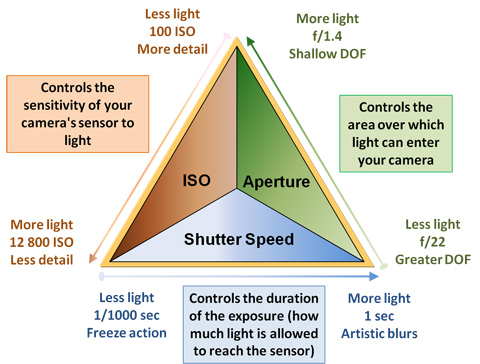
To revise exposure and composition take the following photographs on manual and post on your blog - remember to label your photos with task number and exposure settings.
1. Extreme close-up - shallow depth of field (background will appear out of focus).
2. Mid/long shot - greater depth of field (everything will be in focus).
3. Freeze motion - fast shutter speed.
4. Blurred motion - slower shutter speed.
5. Rule of thirds.
6. Leading lines.
Monday, 19 October 2015
Developing Advertising Ideas

Start looking at ads in different media and taking note of the ones that really work, and why they work. Consider using humour, satire, or parody to engage your audience.
For an introduction to what makes a successful advertising campaign view you tube clips from The Gruen Transfer - The Pitch.
Sunday, 11 October 2015
Adobe Illustrator
Your final logo will be rendered in Adobe Illustrator. Please access the Introduction to Adobe Illustrator through our google classroom.
Also, don't forget plenty of great tutorials are available online through Adobe TV.
To get started, create a new file - sized at A4 - and experiment with the brush and blob blush tools. Follow this link to Webgraphics for an introduction to this handy and versatile tool.
You may also wish to register for a free 10 day trial of design resource hub Lynda.com, which has a wealth of tutorials and tips relevant to logo design.
Also, don't forget plenty of great tutorials are available online through Adobe TV.
To get started, create a new file - sized at A4 - and experiment with the brush and blob blush tools. Follow this link to Webgraphics for an introduction to this handy and versatile tool.
You may also wish to register for a free 10 day trial of design resource hub Lynda.com, which has a wealth of tutorials and tips relevant to logo design.
Saturday, 10 October 2015
A Brief Introduction to Logo Design
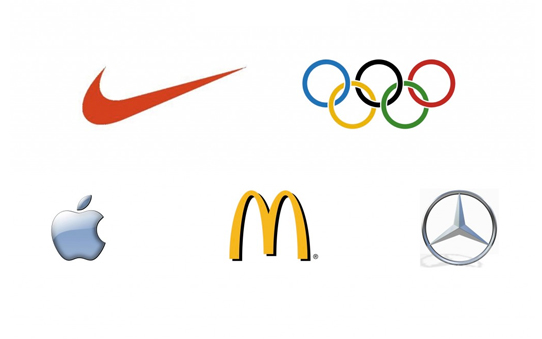
Above are a handful of logos that are simple, uncluttered, iconic, and memorable. They are more than a brand symbol - they instantly generate associations around what each product stands for (ie, Nike's 'tick of approval', the Olympics linked rings = unity).
6. Your job as a designer is to decide what you want your brand to be associated with (quality, reliability, etc) and try to convey aspects of that in your logo design. Follow this link to view a slide show - Introduction to Logo Design.
7. Follow this next link to experiment with some "free" and very basic design software at Logo Maker. The first page has some good advice on generating an effective logo, and a link to their editing software. NB* Don't buy your design - just access the free web-based version and link it to your blog.
Thursday, 8 October 2015
Logo Design Week 1 Term 4
By now you ought to have posted your definition of the term logo, 3 examples of logos you find visually effective, and decided on the product/service you are to develop your logo for. These are to be posted on your blog.
Today, please continue with the following:
4. Write a brief rationale for your proposed business idea - describe your product/service, who is your target market/demographic? What values/associations do you wish to make with your product/service? Post on blog.
5. Begin sketching ideas for your logo: produce at least 5 different design ideas for your product/service. Photograph your sketches and upload to your blog. *NB - These sketches are works in progress, don't be too concerned with the quality of your drawing at this stage: what is important is the idea.
Today, please continue with the following:
4. Write a brief rationale for your proposed business idea - describe your product/service, who is your target market/demographic? What values/associations do you wish to make with your product/service? Post on blog.
5. Begin sketching ideas for your logo: produce at least 5 different design ideas for your product/service. Photograph your sketches and upload to your blog. *NB - These sketches are works in progress, don't be too concerned with the quality of your drawing at this stage: what is important is the idea.
Subscribe to:
Comments (Atom)